icon.
icon.General ledger access can be disabled based on an employee's user rights. Access to general ledger account posting can be restricted in all areas including:
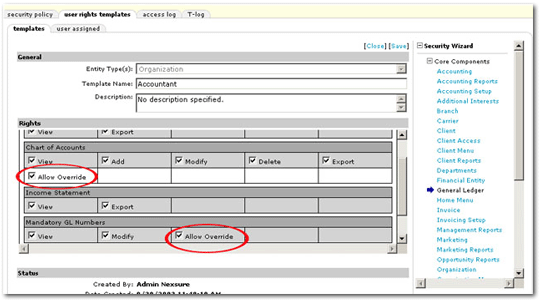
Administrators can grant users the ability to override locked general ledger accounts by modifying the user right's template using the Security Administration screen in the Setup Console.
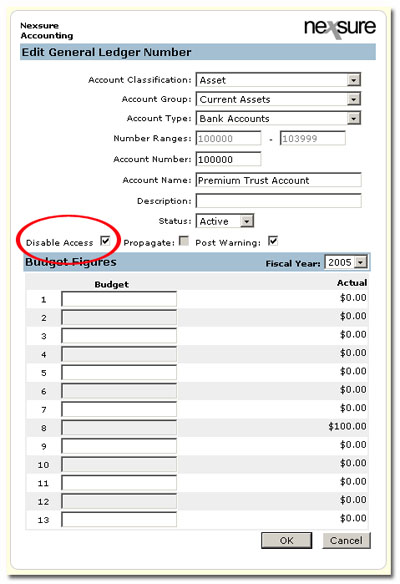
Note: This feature does not affect automatic system posting to any general ledger account that has the Disable Access box checked.
To Disable General Ledger Access
icon.
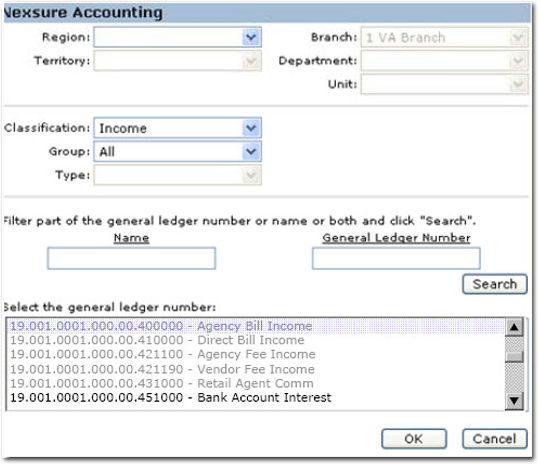
Note: In any area of Nexsure where a general ledger number
can be selected by clicking an ellipsis  button , the
disabled general ledger accounts will appear as grayed out:
button , the
disabled general ledger accounts will appear as grayed out:
To Modify the General Ledger Security Template